
Suricopathe
ElixirLS "Failed to run elixir command" on a Windows machine
Hello everyone,
I am pretty new to the Elixir world and at the same time, I feel like I fall in love with the language, the ecosystem around it and the community.
Currently, I am trying to follow basic elixir exercise and will try to improve upon playing with the Phoenix server and maybe LiveView as well.
So far, I have setup my environment :
- Installed Erlang OTP (27.1) (Directly downloading the Windows installer from the website)
- Installed Elixir (1 .17.3) (Directly downloading the Windows installer from the website)
- Installed the ElixirLS VSCode extension (v0.23.1)
- Opening an Elixir project in VSCode (Basic exercise for Exercism : Hello World in Elixir on Exercism
At this point I have the following error :
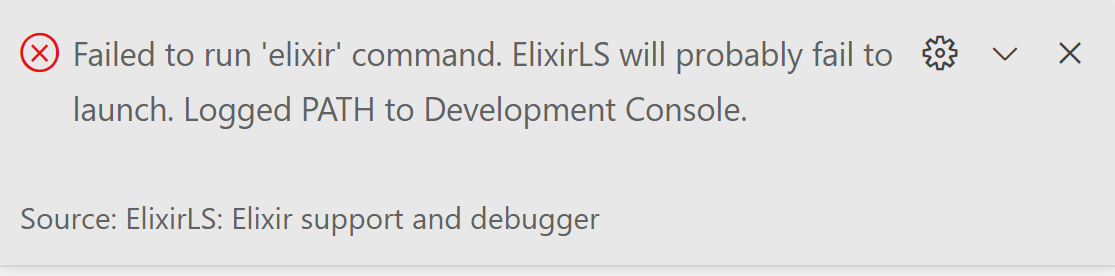
When I take a look at the PATH that is logged, I can see the bin directories of both my elixir and erlang installation.
[Extension Host] Failed to run ‘elixir’ command. Current process’s PATH: C:\Program Files\Exercism;C:\Program Files\Git\mingw64\bin;C:\Program Files\Git\usr\bin;C:\Program Files\Docker\Docker\resources\bin;C:\Program Files\Elixir\bin;C:\Program Files\Erlang OTP\bin
(I trimmed the path logged of unnecessary other paths, to ease readability)
The ElixirLS VSCode extension doesn’t work and it’s a pain to not have a good code editor working properly.
I already tried to restart my laptop several times, uninstall and re-installing everything from scratch.
Do someone experience the same issue ? Can somebody have another idea that I cant see ?
Thank you for your help 
First Post!

krwenholz
If you open the interactive terminal, can you run elixir in there? I’ve found debugging path locations from that terminal to be helpful. I install elixir and friends in a devcontainer with nix, so I’ve hit path issues a number of times.
You might also try running > Reload Window. I know you’ve rebooted, but the window reload can pick up env changes that happen after VSCode starts (a “common” issue for nix+devcontainer).
Popular in Questions







Other popular topics







Latest on Elixir Forum
Sponsor Spotlight

We build reliable cloud platforms for business-critical systems.
Categories:
Sub Categories:
Forums
Our Sponsors

Build Elixir applications with speed and confidence.

Supporting innovation across the BEAM ecosystem.
We build reliable cloud platforms for business-critical systems.

Catch errors, track performance, monitor hosts and more.

Producing high quality Elixir screencasts since 2017.

Enabling companies to succeed by building software people love.

The deployment platform built for Elixir: PaaS ease, VPS control.

Courses that'll move you from confusion to "Aha, now I get it!"