yeshan333
How to install multiple versions of Erlang and Elixir with vfox

vfox (version-fox) is a popular general version management tool write in Go, and the plug-in mechanism uses Lua to achieve extensibility. At present, vfox has supported the management of most mainstream programming language versions, and the ecosystem is quite strong. Here you can see the programming language versions and tools that vfox currently supports and manages → vfox-Available Plugins.
The Elixir and Erlang communities have long been popular for installing and managing multi-version environments through asdf. asdf is also a general-purpose version management tool, and the ecosystem is so rich.
Vfox is very similar to asdf-vm in that it uses .tool-versions file to manage project-level and global version information. This means that if you’ve used asdf before, it won’t be difficult to switch to vfox. Because the core implementations of vfox and vfox are a bit different, vfox executes nearly 5 times faster than ASDF~, and the official documentation also gives benchmark results: version-fox Comparison with asdf-vm
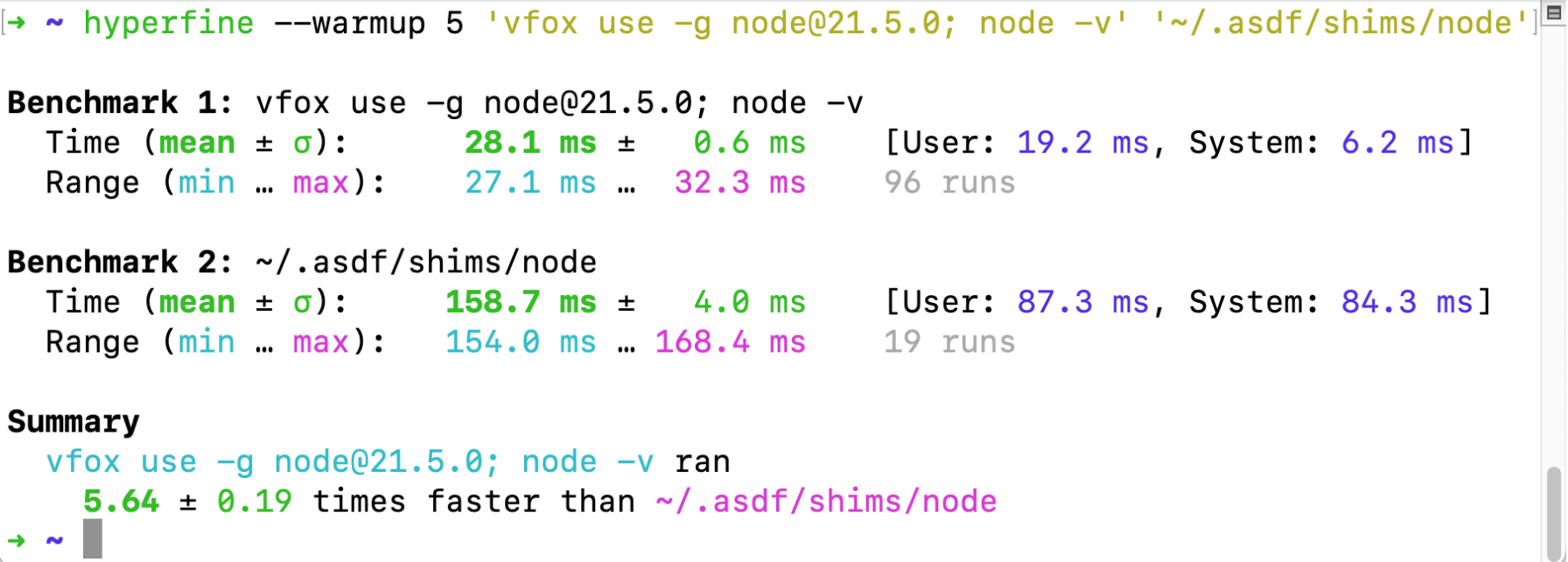
If you’ve been using asdf to manage and maintain multiple versions of Erlang and Elixir, then vfox is also a good choice for you.
This article will show you how to install and manage multiple versions of Erlang and Elixir via vfox.
Install vfox
vfox (version-fox) is cross OS system friendly, which means it can be used on both Windows and Unix-like systems. The core of this article is to install and manage multiple versions of Erlang and Elixir through vfox. Because the two plug-in implementations of vfox to manage Erlang and Elixir versions do not yet support management under the Windows operating system, the sample environment in this article is mainly the Ubuntu 20.04 Linux environment. Let’s get started~
Install vfox (version fox) first:
echo "deb [trusted=yes] https://apt.fury.io/versionfox/ /" | sudo tee /etc/apt/sources.list.d/versionfox.list

sudo apt-get update

sudo apt-get install vfox
In order for vfox to find the installed versions of Elixir and Erlang, vfox needs to be mounted to the shell by default. Next, modify the shell configuration (take Bash as an example):
# Hook your shell

echo 'eval "$(vfox activate bash)"' >> ~/.bashrc
You can also refer to this official documentation to install vfox → https://vfox.lhan.me/guides/quick-start.html. After installing VFOX, let’s install the following plugins:
# add vfox-erlang plugin

vfox add erlang

# add vfox-elixir plugin

vfox add elixir
Next, we can install and manage multiple versions of Erlang and Elixir through the two vfox plugins vfox-erlang and vfox-elixir installed above.
Install Erlang/OTP via the vfox-erlang plugin
Because Elixir depends on Erlang, we need to install Erlang before installing Elixir. Erlang is installed through the source code of the corresponding version, so we need to have the corresponding compilation toolchain, here take Ubuntu 20.04 as an example:
sudo apt-get -y install build-essential autoconf m4 libncurses5-dev libwxgtk3.0-gtk3-dev libwxgtk-webview3.0-gtk3-dev libgl1-mesa-dev libglu1-mesa-dev libpng-dev libssh-dev unixodbc-dev xsltproc fop libxml2-utils libncurses-dev openjdk-11-jdk
Now it’s time to install Erlang.
# use vfox search get an avaliable version

❯ vfox search erlang

Please select a version of erlang [type to search]:

-> v25.0.4

v24.3.4.16

v24.1.3

v24.0

v24.3

v24.3.2

v25.2

v27.0-rc2

v24.3.4.1

Press ↑/↓ to select and press ←/→ to page, and press Enter to confirm

# you can also specific a version, eg:

vfox install erlang@26.2.2
Theoretically, you could install any version that appears in https://github.com/erlang/otp/releases. Since it is compiled and installed from source, the installation process will take some time. When you see the following message, the installation is complete.
compile info.......

...

Install erlang@26.2.2 success!

Please use vfox use erlang@26.2.2 to use it.
Let’s use vfox to switch to the Erlang/OTP version we just installed to verify that the installation is successful:
❯ vfox use erlang@26.2.2

Now using erlang@26.2.2.

❯ erl

Erlang/OTP 26 [erts-14.2.2] [source] [64-bit] [smp:16:16] [ds:16:16:10] [async-threads:1] [jit:ns]

Eshell V14.2.2 (press Ctrl+G to abort, type help(). for help)

1>
If the REPL wakes up correctly, then install it. Let’s start installing Elixir.
Install Elixir
Because the installation of Elixir is also compiled and installed from the source code of the corresponding version, the compilation of Elixir needs to depend on Erlang, so we first let the current shell can find the Erlang just installed.
# switch shell to a Erlang version

❯ vfox use erlang@26.2.2

Now using erlang@26.2.2.

# install Elixir

> vfox install elixir@1.15.2

.........

.........

Generated ex_unit app

==> logger (compile)

Generated logger app

Generated eex app

==> iex (compile)

Generated iex app

Install elixir@1.15.2 success!

Please use vfox use elixir@1.15.2 to use it.
When you see Install elixir@1.15.2 success!, it means that the installation has been successful. The installation can be confirmed by IEX as a complete success:
❯ vfox use elixir@1.15.2

Now using elixir@1.15.2.

❯ iex

Erlang/OTP 26 [erts-14.2.2] [source] [64-bit] [smp:16:16] [ds:16:16:10] [async-threads:1] [jit:ns]

Interactive Elixir (1.15.2) - press Ctrl+C to exit (type h() ENTER for help)

iex(1)>
If you want to install a different version of Elixir, please make sure that the current version of Erlang/OTP is compatible with the version of Elixir, check this document to confirm compatibility: 《compatibility-and-deprecations.html#between-elixir-and-erlang-otp》。
Set the global usage version
We can use vfox use -g xxx to set the version of Erlang and Elixir that we use by default.
> vfox use -g erlang@26.2.2

> vfox use -g elixir@1.15.2

# make sure setting succ

> cat ~/.version-fox/.tool-versions

erlang 26.2.2

elixir 1.15.2
The End
The two plugins for vfox to install and manage the Erlang/OTP and Elixir versions also support managing multiple versions under MacOS Darwin System. You can check out this document for more information: https://github.com/version-fox/vfox-elixir?tab=readme-ov-file#install-in-darwin-macos-13.
Happy & funny!
Most Liked

dimitarvp
dimitarvp
It’s not only that it’s written in Rust (to me that’s an advantage as well). It’s that it doesn’t use shims and only manipulates $PATH instead, which removes overhead when starting any tool managed by it. (And asdf uses shims.)
Popular in Guides/Tuts








Other popular topics




Latest on Elixir Forum
Sponsor Spotlight

Producing high quality Elixir screencasts since 2017.
Categories:
Sub Categories:
Forums
Our Sponsors

Build Elixir applications with speed and confidence.

Supporting innovation across the BEAM ecosystem.

We build reliable cloud platforms for business-critical systems.

Catch errors, track performance, monitor hosts and more.
Producing high quality Elixir screencasts since 2017.

Enabling companies to succeed by building software people love.

The deployment platform built for Elixir: PaaS ease, VPS control.

Courses that'll move you from confusion to "Aha, now I get it!"