
kip
Image - an image processing library based upon Vix
Image is an image processing library for Elixir. It is based upon the fabulous vix library that provides a libvips wrapper for Elixir.
Image is intended to provide well-documented, performant and reliable common image processing functions in an idiomatic Elixir functional style. It operates at a layer above the very comprehensive set of functions in Vix and libvips.
In a very simple image resizing benchmark, Image is approximately 2 to 3 times faster than Mogrify and uses about 5 times less memory.
Since Image is based upon Vix and libvips it is performant, concurrent, pipelining and has a low memory footprint.
In this first release it focuses on resizing, cropping, masking, corner rounding, circular cropping, metadata extract, metadata minimisation. It also includes some simple functions to make it easy to resize and compress images for many well-known social media platforms at the correct size.
In the next two releases, Image will:
- Provide streamed image processing. That will allow an image to be streamed from a file, or from S3 or from any Elixir stream or enumerable, process the image and then stream its output - including to chunked responses for HTTP applications.
- Provide bi-directional Integration with Nx that will efficiently share memory buffers and make it even simpler to involve image processing in ML applications.
Simple examples
Resize to fit
 Image.resize(image, 200, crop: :none)
Resize to fill
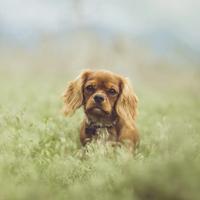 Image.resize(image, 200, crop: :attention)
Crop image
 Image.crop!(image, 550, 320, 200, 200)
Rounded corners
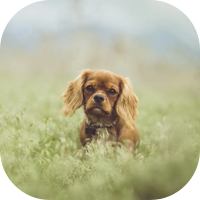 image |> Image.resize!(200, crop: :attention) |> Image.rounded!()
Avatar (circular mask, remove most metadata, crop to a subject of interest)
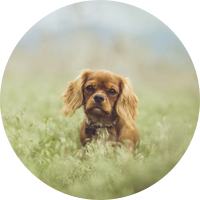 Image.avatar(image, 200)
Most Liked
kip
@Exadra37 well, I couldn’t help myself so I put some work into an API for text and shape overlays. Not quite ready for formal release yet but its available to try from GitHub in the text branch. These demos are in the lib/demo.ex file.
Reproducing the example

The code that produced this is:
  def demo1 do
    {:ok, base_image} = Image.open("test/support/images/Singapore-2016-09-5887.jpg")
    {:ok, polygon} = Shape.polygon(@points, fill_color:  @polygon_color, stroke_color: "none", height: Image.height(base_image), opacity: 0.8)
    {:ok, explore_new} = Text.new_from_string("EXPLORE NEW", font_size: 95, font: "DIN Alternate")
    {:ok, places} = Text.new_from_string("PLACES", font_size: 95, font: "DIN Alternate")
    {:ok, blowout} = Text.new_from_string("BLOWOUT SINGAPORE SALE", font_size: 40, font: "DIN Alternate")
    {:ok, start_saving} = Text.new_from_string("START SAVING", font_size: 30, padding: 20, background_fill_color: "none", background_stroke_color: "white", background_stroke_width: 5)

    base_image
    |> Image.compose!(polygon, x: :middle, y: :top)
    |> Image.compose!(explore_new, x: 260, y: 200)
    |> Image.compose!(places, x: 260, y: 260)
    |> Image.compose!(blowout, x: 260, y: 340)
    |> Image.compose!(start_saving, x: 260, y: 400)
    |> Image.write!("/Users/kip/Desktop/polygon.png")
  end
Simple Text Overlay

Which is created with:
  def demo3 do
    {:ok, base_image} = Image.open("test/support/images/Singapore-2016-09-5887.jpg")
    {:ok, singapore} = Text.new_from_string("Singapore", font_size: 100, font: "DIN Alternate")

    base_image
    |> Image.compose!(singapore, x: :center, y: :middle)
    |> Image.write!("/Users/kip/Desktop/center_text.png")
  end
Transparent Text

This one is quite fun. Reversed text, full screen overlay with transparency. Created with:
  def demo2 do
    {:ok, base_image} = Image.open("test/support/images/Singapore-2016-09-5887.jpg")
    {:ok, singapore} = Text.new_from_string("SINGAPORE", font_size: 250, font: "DIN Alternate", padding: base_image, text_fill_color: :transparent, background_fill_color: "black", background_fill_opacity: 0.6)

    base_image
    |> Image.compose!(singapore)
    |> Image.write!("/Users/kip/Desktop/overlay.png")
  end
Should be able to have both text overlays and shape overlays finished on the weekend.
kip
Today is object detection Sunday. Greatly inspired by the fabulous talk by @hansihe at the Warsaw Elixir Meetup earlier this month I transcribed his live coding example and implemented it in a new experimental module, Image.Detection.
Based upon his solid observations I also added some quality of life improvements to the detect branch of Image:
Image.from_kino/2andImage.from_kino!/2to easily consume the image data from aKino.Input.Imagedata source in LivebookImage.Shape.rect/3andImage.Shape.rect!/3to have a composable way to draw rectangles - specifically object bounding boxes in this case.Image.embed/4andImage.embed!/4to make it much easier to conform an image to the dimensions required by an ML model.
The code is ready for fun and experimentation. Given some of the tricky dependency configuration at the moment it can only be used as a GitHub dependency for now. You can add it in a mix.exs as:
{:image, github: "elixir-image/image", branch: "detect"}`
Demo example
Livebook coming this week!
iex> i = Image.open!("./test/support/images/elixir_warsaw_meetup.png")
%Vix.Vips.Image{ref: #Reference<0.3196308165.1633288229.90166>}
iex> Image.Detection.detect(i)
{:ok, %Vix.Vips.Image{ref: #Reference<0.3196308165.1633288229.90638>}}

The code
Its amazing how little code this takes with Nx, Axon and Axon Onnx.
  def detect(%Vimage{} = image, model_path \\ default_model_path()) do
    # Import the model and extract the
    # prediction function and its parameters.
    {model, params} = AxonOnnx.import(model_path)
    {_init_fn, predict_fn} = Axon.build(model, compiler: EXLA)

    # Flatten out any alpha band then resize the image
    # so the longest edge is the same as the model size,
    # then add a black border to expand the shorter dimension
    # so the overall image conforms to the model requirements.
    prepared_image =
      image
      |> Image.flatten!()
      |> Image.thumbnail!(@yolo_model_image_size)
      |> Image.embed!(@yolo_model_image_size, @yolo_model_image_size)

    # Move the image to Nx. This is nothing more
    # than moving a pointer under the covers
    # so its efficient. Then conform the data to
    # the shape and type required for the model.
    # Last we add an additional axis that represents
    # the batch (we use only a batch of 1).
    batch =
      prepared_image
      |> Image.to_nx!()
      |> Nx.transpose(axes: [2, 0, 1])
      |> Nx.as_type(:f32)
      |> Nx.divide(255)
      |> Nx.new_axis(0)

    # Run the prediction model, extract
    # the only batch that was sent
    # and transpose the axis back to
    # {width, height} layout for further
    # image processing.
    result =
      predict_fn.(params, batch)[0]
      |> Nx.transpose(axes: [1, 0])

    # Filter the data by certainty,
    # zip with the class names, draw
    # bounding boxes and labels and the
    # trim off the extra pixels we added
    # earlier to get back to the original
    # image shape.
    result
    |> Yolo.NMS.nms(0.5)
    |> Enum.zip(classes())
    |> draw_bbox_with_labels(prepared_image)
    |> Image.trim()
  end
Next steps
This is a proof-of-concept only. The API will almost certainly change - not all use cases require painting a bounding box with labels. Feedback however is most welcome!.
Thanks again to @hansihe, the work is all his.
kip
Thanks to some fabulous work by @akash-akya in the new Vix version 0.11.0, Image version 0.4.0 is now released with a focus on image streaming.
Changelog
-
Adds support for opening streaming images. This allows images to be streamed from
File.stream!/3or from anyt:Enumerable.t/0including those created from ExAws.S3 by ExAws.stream!/2. -
Adds support writing streaming images. This allows images to be streamed as an enumerable which can then be consumed by
Plug.Conn.chunk/2, byExAws.S3.upload/3,File.stream/3or any other function that processes stream resources. See thetest/stream_image_test.exsfile for examples. -
Adds a
:memoryoption toImage.write/3. Instead of a path name or stream, use:memoryif you’d like to return abinaryform of an image in its formatted type. Note that this will run the image transformation pipeline resulting in the entire final image being loaded into memory. Therefore this option should be used sparingly since most use cases do not require this option. It is primarily added to facilitate passing images to other libraries in the Elixir ecosystem.
Use case
One of the benefits of libvips, and therefore Vix, is that transformations are built in pipelines. Its actually quite a lot like Elixir pipelines in nature (albeit the implementation is wildly different).
This means we can support streaming an image into Image.open/2, apply a pipeline of transformations and stream the image out with Image.write/3 or Image.stream/2. These operations all happen concurrently: streaming the image into the pipeline, the pipeline itself, and the streaming out again. Very memory efficient, very Elixir friendly, very easy to apply in an application.
Example
Imagine an example where we want to stream an image from S3, apply some transformations, and stream the image to an HTTP client. Here’s the code:
ExAws.S3.download_file("images", "Hong-Kong-2015-07-1998.jpg", :memory)
|> ExAws.stream!()
|> Image.open!()
|> Image.resize!(200)
|> Image.write(conn, suffix: ".jpg")
Here conn is the conn of a Plug/Phoenix request. All the machinery of streaming is abstracted away. Some additional headers would need to be set for the MIME type and filename but apart from that there is nothing to do.
Another approach makes the stream more explicit but ultimately is the same example as that above:
ExAws.S3.download_file("images", "Hong-Kong-2015-07-1998.jpg", :memory)
|> ExAws.stream!()
|> Image.open!()
|> Image.resize!(200)
|> Image.stream!(suffix: ".jpg")
|> Enum.reduce_while(conn, fn (chunk, conn) ->
  case Plug.Conn.chunk(conn, chunk) do
    {:ok, conn} ->
      {:cont, conn}
    {:error, :closed} ->
      {:halt, conn}
  end
end)
Next steps
The next release will focus on interoperability with eVision and hopefully also Nx. This will enable interaction with the very cool axon and axon_onnx.
Feedback and suggestions
After the next release, primary development will be user-driven. Open an issue, start a discussion or comment here with what you’d like to see.
kip
Turns out that Nx integration was really straight forward due primarily to the excellent work of @akash-akya and the Nx team. Introducing Image version 0.5.0 with the following changelog entry:
Enhancements
-
Adds
Image.to_nx/1to convert an image to an Nx tensor. -
Adds
Image.from_nx/1to convert an Nx tensor into an image.
The conversation take care of ensuring type compatibility and ensuring the correct axes in the right order for Image.
When calling Image.to_nx/1, there is no data copying, just passing a reference to a heap binary so the movement is fast and garbage collection takes care of cleaning up.
kip
Another Sunday, another release, image version 0.36.0. It’s a relatively small release but given all the contrast-related enhancements last week, one of the key features missing has been histograms.
Enhancements
- Adds
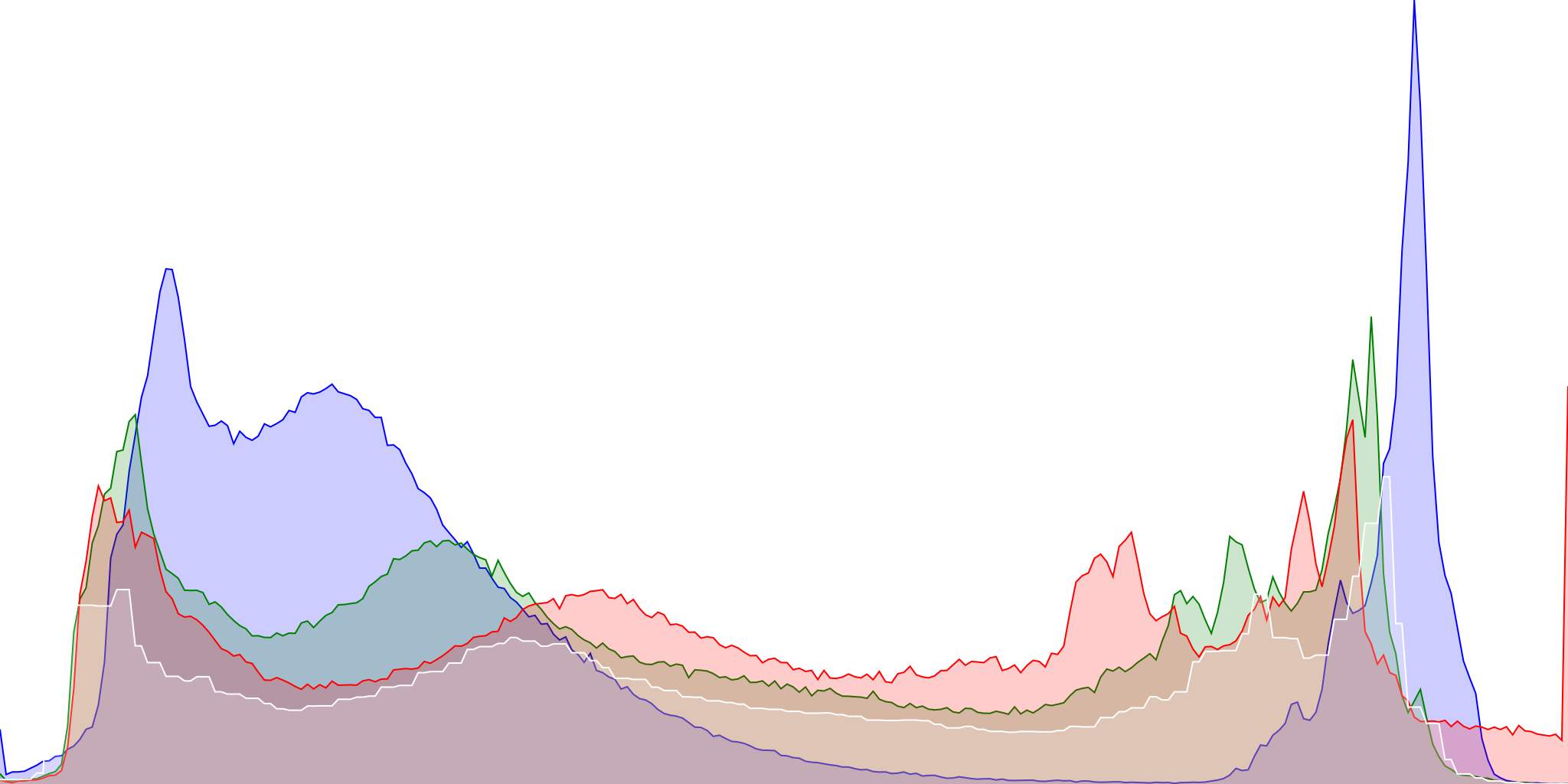
Image.Histogram.as_svg/2andImage.Histogram.as_image/2to return the histogram of an image as either an SVG format suitable to adding to an HTML page or as ant:Vix.Vips.Image.t/0. The histogram is separated into red, green, blue and luminance bands.
Example
iex> i = Image.open! "./test/support/images/Kamchatka-2019-8754.jpg"

iex> Image.Histogram.as_image!(i, height: 1024, width: 2048)
Popular in Libraries





Other popular topics




Latest on Elixir Forum
Sponsor Spotlight

We build reliable cloud platforms for business-critical systems.
Categories:
Sub Categories:
Forums
Our Sponsors

Build Elixir applications with speed and confidence.

Supporting innovation across the BEAM ecosystem.
We build reliable cloud platforms for business-critical systems.

Catch errors, track performance, monitor hosts and more.

Practical resources that improve the lives of professional developers.

Develop your skills with books, videos, and courses.

Enabling companies to succeed by building software people love.

Courses that'll move you from confusion to "Aha, now I get it!"