
Njala
List in params with Nested Dynamic form
Hi everyone!
I’m currently making a web page were we can create protections. Each protection has a list of targets, which are created when you create a protection. Since the length of targets change based on the protection, I needed to implement an add target button, which dynamically adds a target form to the protection one. All of that works.
The problem comes when I submit the form. The params passed to update or create in my protection_controller are just noted like this, where status is one of the option in the target form:
%{
"status_0" => "false"
"status_1" => "true"
"status_2" => "false"
}
which looks ok, but the thing is, I will only get one “status_0”, which will be overiten by the next target form. The expected params would probably look more like this:
%{
"target_0" => {
  "status_0" => "false"
  "status_1" => "true"
  "status_2" => "false"
  }

"target_1" => {
  "status_0" => "false"
  "status_1" => "true"
  "status_2" => "false"
  }
}
I’m not sure how to make list or maps to give to params, especially since it’s dynamic.
Here’s the code I have to make it dynamic:
In my html
<div class="form-group">
    <%= label f, :target, class: "control-label" %>
    <%= prot_array_input_new f, :target, @conn  %>
    <%= prot_array_add_button_new f, :target, @conn %>
    <%= error_tag f, :target %>
</div>

In my view:

 def prot_array_input_new(form, field, conn) do
    values = Phoenix.HTML.Form.input_value(form, field) || [""]
    id = Phoenix.HTML.Form.input_id(form, field)
    content_tag :ol,
                id: prot_container_id(id),
                class: "input_container",
                data: [
                  index: Enum.count(values)
                ] do
      values
      |> Enum.with_index()
      |> Enum.map(
           fn {value, index} ->
             new_id = id <> "_#{index}"
             input_opts = [
               name: prot_new_field_name(form, field),
               value: value,
               id: new_id,
               class: "form-control"
             ]
             prot_form_elements_new(form, field, value, index, conn)
           end
         )
    end
  end

  defp prot_form_elements_new(form, field, value, index, conn) do

    id = Phoenix.HTML.Form.input_id(form, field)
    new_id = id <> "_#{index}"
    input_opts = [
      name: prot_new_field_name(form, field),
      value: value,
      id: new_id,
      class: "form-control"
    ]
    content_tag :li do
      [
        render(MyAppWeb.ProtectionView, "new_target.html", conn: conn, f: form, new_id: new_id),
        link(
          "Remove",
          to: "#",
          data: [ id: new_id ],
          title: "Remove",
          class: "remove-form-field"
        )
      ]
    end
  end

def prot_array_add_button(form, field, conn) do
    id = Phoenix.HTML.Form.input_id(form, field)
    content = prot_form_elements_new(form, field, "", "__name__", conn)
              |> safe_to_string
    data = [
      prototype: content,
      container: prot_container_id(id)
    ];
    link("Add", to: "#", data: data, class: "add-form-field")
  end
And the bit of JS:
const removeElement = ({target}) => {
        let el = document.getElementById(target.dataset.id);
        let li = el.parentNode;
        li.parentNode.removeChild(li);
    }
    Array.from(document.querySelectorAll(".remove-form-field"))
    .forEach(el => {
        el.onclick = (e) => {
            removeElement(e);
        }
    });

    Array.from(document.querySelectorAll(".add-form-field"))
    .forEach(el => {
        el.onclick = ({target: {dataset}}) => {
            console.log(dataset.container)
            let container = document.getElementById(dataset.container);
            let index = container.dataset.index;
            let newRow = dataset.prototype;
            container.insertAdjacentHTML("beforeend", newRow.replace(/__name__/g, index));
            container.dataset.index = parseInt(container.dataset.index) + 1;
            Array.from(document.querySelectorAll(".remove-form-field")).forEach(el => {
                el.onclick = (e) => {
                    removeElement(e);
                }

            })
        }
    });
I’m still new to Elixir and phoenix, so if I missed something, or if something is not clear, ask and I’ll correct myself or tell you any missing information. Thanks in advance!
Marked As Solved
Njala
So I found my answer:
I basicly go with what @dimitarvp said, I named my fields with [], which ends up looking like this:
<%= checkbox @form, :status_1, name: "protection[target]["<>@idTarget<>"][status_1]" %> Status 1 checkbox
You need to put multiple layers of brackets like I did to get a list or a map. For instance, the checkbox returns this to my server:
%{
  "target" => %{
    "01" => %{
      "status_1" => "true"
    }
  }
}
This is readable on my server side and works when creating or modifying a protection with targets.
ps: if you want a list, and not a map, you can do it by not putting anything in the bracket, like so:
protection[target]["<>@idTarget<>"][]
this is going to return a list.
Thanks a lot!
Also Liked

peerreynders
All of this can be fairly cleanly accomplished with inputs_for/4 (see target.html.eex).
For demonstration purposes only:
  # in FormArrayWeb.Router
  #
  scope "/", FormArrayWeb do
    pipe_through :browser

    get "/", PageController, :index
    post "/", PageController, :update
  end
# file: form_array/lib/form_array_web/controllers/page_controller.ex
#
defmodule FormArrayWeb.PageController do
  use FormArrayWeb, :controller

  @init_targets %{
    "target_00" => %{
      "status_0" => "false",
      "status_1" => "true",
      "status_2" => "false"
    },
    "target_01" => %{
      "status_0" => "true",
      "status_1" => "false",
      "status_2" => "true"
    }
  }

  def index(conn, _params) do
    conn = Map.update!(conn, :params, &Map.put(&1, "targets", @init_targets))
    render(conn, "index.html")
  end

  def update(conn, params) do
    IO.inspect(params)
    conn = put_flash(conn, :info, "update params: #{inspect(params)}")
    render(conn, "index.html")
  end
end
# file: form_array/lib/form_array_web/views/page_view.ex
#
defmodule FormArrayWeb.PageView do
  use FormArrayWeb, :view

  @template_name "target_dd"

  @template_states %{
    "status_0" => "false",
    "status_1" => "false",
    "status_2" => "false"
  }

  # extract list of {key_name, map_of_values} tuples
  # sorted by "key_name"
  # from the map stored under "name"
  def target_list(conn, name) do
    targets = conn.params[name]

    targets
    |> Map.keys()
    |> Enum.sort()
    |> Enum.map(&{&1, targets[&1]})
  end

  def target_state_list(states) do
    states
    |> Map.keys()
    |> Enum.sort()
    |> Enum.map(&{&1, states[&1]})
  end

  def render_target(form, name, states) do
    render("target.html", form: form, name: name, states: states)
  end

  def render_target_template(form) do
    render_target(form, @template_name, @template_states)
  end
end
<!-- form_array/lib/form_array_web/templates/page/index.html.eex -->
<style>
  input[type="checkbox"] + label {
    display: inline;
    padding-left: 0.3rem;
    font-weight: normal;
  }
  fieldset li {
     margin-bottom: 0;
  }
  fieldset input[type="checkbox"] {
    margin-bottom: 0.3rem;
  }
  fieldset ol {
   margin-bottom: 1.0rem;
  }
  form section {
   padding: 0.5rem 1.0rem;
    border: thin solid;
    margin-bottom: 1.0rem;
  }
</style>
<% targets_name = "targets" %>
<%= form_for @conn, Routes.page_path(@conn, :update), [as: targets_name, method: :post, id: targets_name], fn f ->%>
  <section>
    <%= for {target, states} <- target_list(@conn, targets_name) do %>
      <%= render_target(f, target, states)  %>
    <% end %>
    <button type="button" data-action="add-target">Add</button>
    <template id="template-target">
      <%= render_target_template(f) %>
    </template>
  </section>
  <%=  submit "Update" %>
<% end %>
<!-- END form_array/lib/form_array_web/templates/page/index.html.eex -->
<%#  file: form_array/lib/form_array_web/templates/page/target.html.eex %>
<fieldset>
  <legend><%= humanize(@name) %></legend>
  <ol>
    <%= inputs_for @form, @name, fn fp -> %>
      <%= for {status, value} <- target_state_list(@states) do %>
        <li>
          <%= checkbox(fp, status, checked_value: "true", unchecked_value: "false") %>
          <%= label(fp, status) %>
        </li>
      <% end %>
    <% end %>
  </ol>
  <button type="button" data-action="remove-target">Remove</button>
</fieldset>
/* At the end of
   form_array/assets/js/app.js
*/

// access template for adding targets
const templateTarget = document.getElementById('template-target')

// Single event listener for the entire "targets" section
let targetsForm = document.getElementById("targets")
targetsForm.addEventListener('click', targetsClickListener)

/*
  --- functions ---
*/

// routes the clicks to the correct function
//
function targetsClickListener({target: element}) {

  // only interested in clicked buttons
  if(element.nodeName !== "BUTTON") {
    return
  }

  switch(element.dataset.action) {
    // no action - nothing to do
    case undefined:
      break

    case 'remove-target':
      let root = element.closest('fieldset')
      if (root) {
        root.remove()
      }
      break

    case 'add-target':
      let parent = element.parentNode
      let newTarget = makeTarget(templateTarget, parent)
      if(newTarget) {
        parent.insertBefore(newTarget, element)
      }
      break
  }
}

function makeTarget(template, parent) {
  let allTargets = parent.querySelectorAll('fieldset')
  let clone = document.importNode(template.content, true)
  const fromTarget = allTargets.length > 0 ? allTargets[allTargets.length - 1] : clone
  const lastName = extractTargetName(fromTarget)
  const newName = nextTargetName(lastName)
  prepareTarget(clone, newName)

  return clone
}

function extractTargetName(target) {
  const input = target.querySelector('input[type=hidden]')
  const beginIndex = input.name.indexOf('[') + 1
  const endIndex = input.name.indexOf(']')
  const targetName = input.name.slice(beginIndex, endIndex).trim()

  const legend = target.querySelector('legend')
  const targetDesc = legend.innerText.trim()

  return [targetName, targetDesc]
}

function nextTargetName([lastName, lastDesc]) {
  const beginIndex = lastName.lastIndexOf('_') + 1
  const lastSuffix = lastName.slice(beginIndex)
  const lastIndex = parseInt(lastSuffix, 10)
  const newIndex = isNaN(lastIndex) ? 0 : lastIndex + 1
  const newSuffix = newIndex.toFixed(0).padStart(2,'0')
  const newName = lastName.slice(0, lastName.lastIndexOf(lastSuffix)) + newSuffix
  const newDesc = lastDesc.slice(0, lastDesc.lastIndexOf(lastSuffix)) + newSuffix

  return [newName, newDesc]
}

function prepareTarget(root, [name, desc]) {
  const [oldName, oldDesc] = extractTargetName(root)
  const prepareInput = input => {
    prepareTargetInput(input, oldName, name)
  }
  const prepareLabel = label => {
    prepareTargetLabel(label, oldName, name)
  }

  root.querySelectorAll('input').forEach(prepareInput)
  root.querySelectorAll('label').forEach(prepareLabel)

  let legend = root.querySelector('legend')
  legend.innerText = replaceTargetDesc(legend.innerText, oldDesc, desc)
}

function replaceTargetDesc(oldText, oldDesc, newDesc) {
  return oldText.split(oldDesc).join(newDesc)
}

function prepareTargetInput(input, oldName, newName) {
  if (input.name) {
    input.name = replaceTargetName(input.name, newName)
  }

  if (input.id) {
    input.id = replaceTargetId(input.id, oldName, newName)
  }
}

function prepareTargetLabel(label, oldName, newName) {
  if (label.htmlFor) {
    label.htmlFor = replaceTargetId(label.htmlFor, oldName, newName)
  }
}

function replaceTargetName(name, newTargetName) {
  const beginIndex = name.indexOf('[') + 1
  const endIndex = name.indexOf(']')
  return name.slice(0, beginIndex) + newTargetName + name.slice(endIndex)
}

function replaceTargetId(id, oldTargetName, newTargetName) {
  const beginIndex = id.indexOf(oldTargetName)
  const endIndex = beginIndex + oldTargetName.length
  return id.slice(0, beginIndex) + newTargetName + id.slice(endIndex)
}
The generated HTML from index looks like this:
<!-- form_array/lib/form_array_web/templates/page/index.html.eex -->
<style>
  input[type="checkbox"] + label {
    display: inline;
    padding-left: 0.3rem;
    font-weight: normal;
  }
  fieldset li {
     margin-bottom: 0;
  }
  fieldset input[type="checkbox"] {
    margin-bottom: 0.3rem;
  }
  fieldset ol {
   margin-bottom: 1.0rem;
  }
  form section {
   padding: 0.5rem 1.0rem;
    border: thin solid;
    margin-bottom: 1.0rem;
  }
</style>
<form accept-charset="UTF-8" action="/" id="targets" method="post">
  <input name="_csrf_token" type="hidden" value="EAgIDBYMbyFnGgYiQFBkBTY4FhYkLhk6uoDcym8WPXvC3e7KoJAUucxM">
  <input name="_utf8" type="hidden" value="✓">
  <section>
    <fieldset>
      <legend>Target 00</legend>
      <ol>
        <li>
          <input name="targets[target_00][status_0]" type="hidden" value="false">
          <input id="targets_target_00_status_0" name="targets[target_00][status_0]" type="checkbox" value="true">
          <label for="targets_target_00_status_0">Status 0</label>
        </li>
        <li>
          <input name="targets[target_00][status_1]" type="hidden" value="false">
          <input id="targets_target_00_status_1" name="targets[target_00][status_1]" type="checkbox" value="true" checked>
          <label for="targets_target_00_status_1">Status 1</label>
        </li>
        <li>
          <input name="targets[target_00][status_2]" type="hidden" value="false">
          <input id="targets_target_00_status_2" name="targets[target_00][status_2]" type="checkbox" value="true">
          <label for="targets_target_00_status_2">Status 2</label>
        </li>
      </ol>
      <button type="button" data-action="remove-target">Remove</button>
    </fieldset>
    <fieldset>
      <legend>Target 01</legend>
      <ol>
        <li>
          <input name="targets[target_01][status_0]" type="hidden" value="false">
          <input id="targets_target_01_status_0" name="targets[target_01][status_0]" type="checkbox" value="true" checked>
          <label for="targets_target_01_status_0">Status 0</label>
        </li>
        <li>
          <input name="targets[target_01][status_1]" type="hidden" value="false">
          <input id="targets_target_01_status_1" name="targets[target_01][status_1]" type="checkbox" value="true">
          <label for="targets_target_01_status_1">Status 1</label>
        </li>
        <li>
          <input name="targets[target_01][status_2]" type="hidden" value="false">
          <input id="targets_target_01_status_2" name="targets[target_01][status_2]" type="checkbox" value="true" checked>
          <label for="targets_target_01_status_2">Status 2</label>
        </li>
      </ol>
      <button type="button" data-action="remove-target">Remove</button>
    </fieldset>
    <button type="button" data-action="add-target">Add</button>
    <template id="template-target">
      <fieldset>
        <legend>Target dd</legend>
        <ol>
          <li>
            <input name="targets[target_dd][status_0]" type="hidden" value="false">
            <input id="targets_target_dd_status_0" name="targets[target_dd][status_0]" type="checkbox" value="true">
            <label for="targets_target_dd_status_0">Status 0</label>
          </li>
          <li>
            <input name="targets[target_dd][status_1]" type="hidden" value="false">
            <input id="targets_target_dd_status_1" name="targets[target_dd][status_1]" type="checkbox" value="true">
            <label for="targets_target_dd_status_1">Status 1</label>
          </li>
          <li>
            <input name="targets[target_dd][status_2]" type="hidden" value="false">
            <input id="targets_target_dd_status_2" name="targets[target_dd][status_2]" type="checkbox" value="true">
            <label for="targets_target_dd_status_2">Status 2</label>
          </li>
        </ol>
        <button type="button" data-action="remove-target">Remove</button>
      </fieldset>
    </template>
  </section>
  <button type="submit">Update</button>
</form>
<!-- END form_array/lib/form_array_web/templates/page/index.html.eex -->
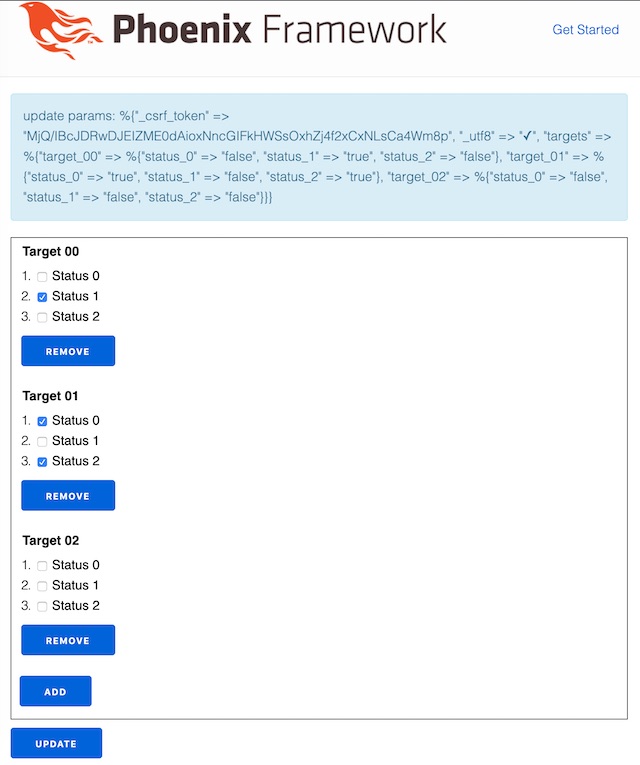
After clicking “Add” and then “Update” the console shows this:
[info] POST /
[debug] Processing with FormArrayWeb.PageController.update/2
  Parameters: %{"_csrf_token" => "LFB0B1okDRFVDz8pGXkDLzgKY3sYDyMgI78h5EZgbMOHjLPaax48IBBW", "_utf8" => "✓", "targets" => %{"target_00" => %{"status_0" => "false", "status_1" => "true", "status_2" => "false"}, "target_01" => %{"status_0" => "true", "status_1" => "false", "status_2" => "true"}, "target_02" => %{"status_0" => "false", "status_1" => "false", "status_2" => "false"}}}
  Pipelines: [:browser]
%{
  "_csrf_token" => "LFB0B1okDRFVDz8pGXkDLzgKY3sYDyMgI78h5EZgbMOHjLPaax48IBBW",
  "_utf8" => "✓",
  "targets" => %{
    "target_00" => %{
      "status_0" => "false",
      "status_1" => "true",
      "status_2" => "false"
    },
    "target_01" => %{
      "status_0" => "true",
      "status_1" => "false",
      "status_2" => "true"
    },
    "target_02" => %{
      "status_0" => "false",
      "status_1" => "false",
      "status_2" => "false"
    }
  }
}
[info] Sent 200 in 3ms
and the page looks like this:

dimitarvp
Apologies, I wasn’t available in the last few hours. Glad you solved it!
For future reference, this functionality is contained in the Plug.Conn.Query module.
iex experiments:
iex(1)> Plug.Conn.Query.decode "a[]=1&a[]=2"
%{"a" => ["1", "2"]}
iex(2)> Plug.Conn.Query.encode %{"a" => ["1", "2"]}
"a[]=1&a[]=2"
iex(3)> Plug.Conn.Query.decode "a[1]=1&a[2]=2"
%{"a" => %{"1" => "1", "2" => "2"}}
iex(4)> Plug.Conn.Query.encode %{"a" => %{"1" => "1", "2" => "2"}}
"a[1]=1&a[2]=2"
This can be very useful to you if you don’t want to modify and test controller methods by hand. Instead, you just use that module’s functions in the iex REPL.
dimitarvp
Name your form fields target_0[], target_1[] etc. (note the opening and closing square bracket in the names). Then you have to make sure that your JS simply appends target_0[], target_1[] etc. to the form dynamically.
Example: assuming your JS builds form parameters like so (note the seemingly incorrect order):
target_0[]=1
target_1[]=4
target_1[]=5
target_1[]=6
target_0[]=2
target_0[]=3
Then this will result in this HTTP POST payload:
target_0[]=1&target_1[]=4&target_1[]=5&target_1[]=6&target_0[]=2&target_0[]=3
Which on the server will be read as:
%{"target_0" => ["1", "2", "3"], "target_1" => ["4", "5", "6"]}
In short, you can construct list form fields. It’s not exactly standard but a lot of frameworks support it (Phoenix / Plug included) and all major browsers allow it as well.
peerreynders
I haven’t parsed through all your code but by your description I have to ask:
Are you trying to nest form elements?
If so, HTML5 disallows that.
Flow content, but with no
formelement descendants.
Popular in Questions







Other popular topics




 Latest Phoenix Threads
Latest on Elixir Forum
Sponsor Spotlight

Build Elixir applications with speed and confidence.
Categories:
Sub Categories:
Forums
Our Sponsors
Build Elixir applications with speed and confidence.

Supporting innovation across the BEAM ecosystem.

We build reliable cloud platforms for business-critical systems.

Catch errors, track performance, monitor hosts and more.

Practical resources that improve the lives of professional developers.

Develop your skills with books, videos, and courses.

Enabling companies to succeed by building software people love.

Courses that'll move you from confusion to "Aha, now I get it!"