
TunkShif
Neovim - Elixir Setup Configuration from Scratch Guide
This post is an instruction guide to help you setup your Neovim for Elixir development from scratch. It includes general information on how to configure syntax highlighting and auto-completion for Elixir language.
Be aware that the Neovim ecosystem is always moving fast, so the content of this post may become outdated for future readers. I’ll try my best to keep this post updated to align with the latest Neovim version.
For those who just want an out-of-box experience, I’d recommend looking into some pre-configured distributions like LazyVim, AstroNvim, NvChad or LunarVim. And then follow their documentation to add Elixir language integration.
Install Neovim
At the time this post is written, the latest released Neovim version is 0.10.0. Check the official guide on how to install neovim on your system.
Then we need to create a new configuration file. Neovim supports using both Vimscript and Lua as its configuration script language, but Lua is preferred in Neovim community. Create a init.lua file in the default Neovim configuration folder.
- If you’re using Linux, BSD or macOS, the default config folder should be
~/.config/nvim - If you’re using Windows, the default config folder should be
~/AppData/Local/nvim - If you’re still not sure, just open your Neovim and execute
:echo stdpath('config')to find out the default config folder
Installing a Plugin Manager
lazy.nvim (not to be confused with the Neovim distro LazyVim) is currently the most popular and well-maintained plugin manager. It supports lazy loading plugins to boost Neovim launch speed.
Copy and paste the following code to your init.lua to bootstrap lazy plugin manager. And remember to set your leader key before using lazy plugin manager.
-- set your leader and local leader key
-- make sure to set `mapleader` and `maplocalleader` before lazy so your mappings are correct
vim.g.mapleader = " " -- using space as leader key
vim.g.maplocalleader = "," -- using comma as local leader

-- bootstrap lazy.nvim plugin manager
local lazypath = vim.fn.stdpath("data") .. "/lazy/lazy.nvim"
if not (vim.uv or vim.loop).fs_stat(lazypath) then
	vim.fn.system({
		"git",
		"clone",
		"--filter=blob:none",
		"https://github.com/folke/lazy.nvim.git",
		"--branch=stable",
		lazypath,
	})
end
vim.opt.rtp:prepend(lazypath)
Installing a Language Server
A language server is what provides features like auto complete, go to definition, error diagnostics, etc. There are several language server implementations for Elixir including elixir-ls, lexical and next-ls. This comparison table gives an overview of which features are implemented for each language server.
Choose a language server and follow its documentation to install it. If you have no idea which one to use, then I would recommend just using elixir-ls.
After language server installation, add the following configuration to your init.lua to install language server configurations for Neovim.
require("lazy").setup({
	{
		"neovim/nvim-lspconfig",
		config = function()
			local lspconfig = require("lspconfig")
			lspconfig.elixirls.setup({
        -- you need to specify the executable command mannualy for elixir-ls
				cmd = { "/path/to/elixir-ls/language_server.sh" },
			})
		end,
	},
})
Reference to nvim-lspconfig/doc/server_configurations.md for other language servers configuration guide.
Launch your Neovim, and the plugin manager should automatically install the newly added plugin as show below. You can also execute :Lazy command to open the plugin manager.

Try to open an Elixir file, then run :LspInfo, you should see that the language server is running.
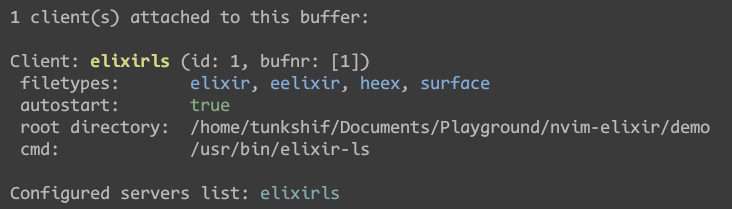
The Neovim language server config plugin comes with some default key mappings for features like hover documentation, go to definition, formatting and other stuff. You can further customize this according to the nvim-lsp configuration section.
Installing Tree-Sitter for Syntax Highlighting
Tree-sitter is a parser generator tool that Neovim uses to provide fast and accurate syntax highlighting.
Add Neovim tree-sitter plugin to your configuration, and install Elixir language related parsers (don’t forget to install the tree-sitter CLI prerequisite). If you want to enable treesitter for other languages, refer to nvim-treesitter for more config options.
Also remember to install a colorscheme that has tree-sitter supports.
require("lazy").setup({
    -- other plugins
	{
		"nvim-treesitter/nvim-treesitter",
		config = function()
			require("nvim-treesitter.configs").setup({
				ensure_installed = { "elixir", "eex", "heex" },
				highlight = { enable = true },
				indent = { enable = true },
			})
		end,
	},
})
Now your elixir file should have syntax highlighting and auto indent.
Configuring Code Auto-Completion
Install nvim-cmp plugin for auto completion support. Add the following configuration.
require("lazy").setup({
    -- other plugins
	{
		"hrsh7th/nvim-cmp",
		dependencies = {
			-- install different completion source
			"hrsh7th/cmp-nvim-lsp",
			"hrsh7th/cmp-buffer",
			"hrsh7th/cmp-path",
		},
		config = function()
			local cmp = require("cmp")
			cmp.setup({
				-- add different completion source
				sources = cmp.config.sources({
					{ name = "nvim_lsp" },
					{ name = "buffer" },
					{ name = "path" },
				}),
				-- using default mapping preset
				mapping = cmp.mapping.preset.insert({
					["<C-Space>"] = cmp.mapping.complete(),
					["<CR>"] = cmp.mapping.confirm({ select = true }),
				}),
				snippet = {
					-- you must specify a snippet engine
					expand = function(args)
						-- using neovim v0.10 native snippet feature
						-- you can also use other snippet engines
						vim.snippet.expand(args.body)
					end,
				},
			})
		end,
	},
})
We also need some addition to lspconfig for nvim-cmp support. Add the following configuration to language server setup.
require("lazy").setup({
	{
		"neovim/nvim-lspconfig",
		config = function()
			local lspconfig = require("lspconfig")
			local capabilities = require("cmp_nvim_lsp").default_capabilities()
			lspconfig.elixirls.setup({
				cmd = { "elixir-ls" },
				-- set default capabilities for cmp lsp completion source
				capabilities = capabilities,
			})
		end,
	},
}
After that, the auto completion should work now. The default mapping uses <C-n> and <C-p> to select completion items, and uses <CR> to confirm the selected item.
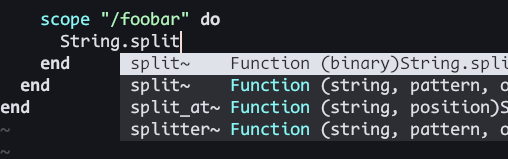
For more customized settings, refer to nvim-cmp wiki page.
The Final Config File
Now you have a minimal functional Neovim config setup for Elixir development. The final complete init.lua file can can be found here.
Feel free to add more features to your own customized Neovim.
Tips and Tricks
Switching between Multiple Neovim Configurations
Neovim 0.9 introduced a new feature that allows you to use NVIM_APPNAME environment variable for switching between different Neovim configurations.
The default configuration folder for Neovim is ~/.config/nvim (for Unix-Like OS users). You can change that folder by specifying NVIM_APPNAME environment variable.
For example, launch neovim with NVIM_APPNAME=nvim-elixir nvim command. Neovim will pick the ~/.config/nvim-elixir folder as the default configuration location.
This is useful when you want to try out a different Neovim distro, but still want to keep your current configuration.
Tailwind CSS Support For Elixir and HEEx file
Add the following configuration to tailwind css lsp settings. And now you should get class name suggestions for .ex and .heex files.
lspconfig.tailwindcss.setup({
  init_options = {
    userLanguages = {
      elixir = "html-eex",
      eelixir = "html-eex",
      heex = "html-eex",
    },
  },
})
Most Liked

AstonJ
This is fantastic, thanks for posting @TunkShif 
I followed your instructions and can confirm it works, the only thing I did differently was I added the local capabilities =... and capabilities = capabilities lines from here:
To the ElixirLS part above:
-- setting up the elixir language server
-- you have to manually specify the entrypoint cmd for elixir-ls
require('lspconfig').elixirls.setup {
  cmd = { "/path/to/elixir-ls/language_server.sh" },
  on_attach = on_attach
}
I have also installed LunarVim 
My plan is to see how I get on with them as well as Doom Emacs …and I’ll be interested in hearing how others do too!

Nezteb
Neovim version 0.11 just released.
One of the highlights is “Simpler LSP setup and configuration”.

adw632
I would suggest not just using lazy package manager but the LazyVim distro.
LazyVim is by the far the cleanest and well structured nvim distro I have used. I have used a number of distros including bootstrapping nvim from scratch. LazyNvim is not intrusive, its transparent and very easy to get started and customise however you want.
One of the great features of LazyNvim that it has working Elixir language support out of the box.
I use asdf to ensure I have a very recent stable version of nvim and recommend asdf as the way to go for installing and managing versions of Erlang/OTP, node etc too.
The Elixir plugin is described here, along with all the plugin defaults it enables:
One you have followed the easy peasy LazyVim installation, just add a single elixir plugin “lazyvim.plugins.extras.lang.elixir” to lua/config/lazy.lua and you’re cooking with gas:
require("lazy").setup({
  spec = {
    { "LazyVim/LazyVim", import = "lazyvim.plugins" },
    { import = "lazyvim.plugins.extras.lang.elixir" },
    { import = "plugins" },
  },
})

JEG2
I’ve finally been experimenting with Neovim. I’m trying to build my own minimal config for what would make me comfortable. This thread has been a big help to me in getting past the initial steps and figuring out which plugins were key. Here’s my attempt to give back a little.
The one thing I didn’t see mentioned in here that I think is really important is the mason.nvim plugin. This is a plugin that automates the installation of the various LSP servers. I think this is far superior to doing something like brew install elixir-ls. If we do that install with Homebrew, we also get a copy of Erlang and a copy of Elixir. However, most of us are probably managing the languages we want with a tool like asdf. Given that, you need to take care to ensure that you are always using the executable you think you’re using. mason.nvim removes that concern because it is going to install the language server using whatever version of Erlang and Elixir that Neovim can see and execute. You can see my config using mason.nvim and another plugin to tie it into the LSP plugin. Note that I am not yet using Neovim’s built-in LSP functionality.

threeaccents
The treesitter Elixir issues have mostly been fixed in NeoVim 0.7
Popular in Wikis




Other popular topics


Latest on Elixir Forum
Sponsor Spotlight

Producing high quality Elixir screencasts since 2017.
Categories:
Sub Categories:
Forums
Our Sponsors

Build Elixir applications with speed and confidence.

Supporting innovation across the BEAM ecosystem.

We build reliable cloud platforms for business-critical systems.

Catch errors, track performance, monitor hosts and more.

Develop your skills with books, videos, and courses.
Producing high quality Elixir screencasts since 2017.

The deployment platform built for Elixir: PaaS ease, VPS control.

Courses that'll move you from confusion to "Aha, now I get it!"